Another GTranslate Pitfall for Smaller Languages? Sitemap 301 Redirects Break GSC Crawling
Hi everyone, this is Neo.
A while back I wrote about the GTranslate noindex problem — exposing a sneaky, deep SEO pitfall in this smaller-language translation service: 深挖一下独立站小语种插件gtranslate的坑
After fixing that one, I thought the coast was clear. Currently I even have a crawler auto-visiting each generated smaller-language page once to force the cache and keep the noindex issue at bay.
But Murphy’s Law tells us: if something can go wrong, it will — no matter how unlikely.
During a routine sweep of my GSC (Google Search Console) data recently, I spotted another bizarre pattern: the smaller-language site’s sitemaps were showing massive crawl errors.
01 The Weird “Page Couldn’t Be Fetched”
Here’s the situation: the main site’s sitemap crawled fine, but the sub-sitemaps with link lists (like archive-1.xml, category-sitemap.xml, etc.) were all flagged red with errors.
I clicked into one of the erroring sub-sitemap URLs to investigate.
And wouldn’t you know it — the browser address bar flashed, and it 301-redirected straight to the corresponding link on the main site!
For example:
I visited the Spanish site’s: https://es.dtfulogistics.com/archive-1.xml
and it jumped to the English main site’s: https://www.dtfulogistics.com/archive-1.xml
That gave me a scare! What’s going on?
If it’s a 301 redirect, Googlebot would either fetch the main site’s content, or simply treat it as a bad redirect — either way it can’t read the smaller-language links inside. No wonder GSC kept saying “couldn’t fetch.”
02 Who Touched My Sitemap?
Facing this kind of paranormal event, my first instinct was: did I misconfigure something myself?
As a veteran site owner, I suspected my own server config first. So I logged into the server and pulled up Nginx’s access log.
I tried hitting that smaller-language sitemap URL again while watching the log scroll.
Result: the log was empty — no 301 redirect record at all.
What does that mean? It means the request never even reached my server!
If it was intercepted and redirected before arriving at my door, there’s only one culprit: GTranslate’s proxy servers.
As you may know, GTranslate’s paid plan works via a CNAME setup — traffic flows through their servers for translation processing first, then back to the user.
So I emailed GTranslate support directly, asking (politely) what was going on:
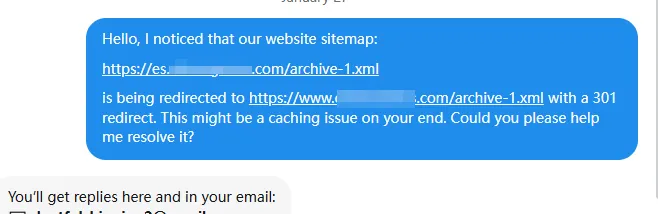
My email: Hello, I noticed that our website sitemap:
https://es.dtfulogistics.com/archive-1.xmlis being redirected tohttps://www.dtfulogistics.com/archive-1.xmlwith a 301 redirect. This might be a caching issue on your end. Could you please help me resolve it?
03 The Official “Unwritten Rule”
Half a day later, I got the official reply. It cracked the case — and gave me a whole new appreciation for this plugin’s “bandwidth-saving” strategy.
GTranslate’s official response:
Hi, and thanks for your message.
In order for a sitemap to be processed by GTranslate, it must start with the word sitemap, and have a .xml extension.
We’re treating normal URLs like HTML files… The problem with XML feeds is that they get updated quite often, and content within them can reach huge numbers, which would overload our servers in no time. So, we exclude XML files.
Obviously, our customers need sitemaps, so we add a rule to exclude XML files unless they’re sitemaps. We identify the sitemaps by the name, that’s why it has to contain the word sitemap in the name.
Neo’s take:
The official explanation is blunt and clear:
- To save server resources, they don’t process XML files by default (either 301-ing them back to the origin or treating them as HTML).
- Because XML files are usually RSS feeds — frequently updated and potentially huge — translating them would blow up their servers.
- However, they know customers need sitemaps.
- So they set a hard rule: only files whose names contain “sitemap” and end in .xml are treated as sitemaps and let through normally, without the 301 redirect.
And there’s the trap!
Many CMS systems (like some WordPress plugins) don’t always name their sub-sitemaps with the word sitemap. My archive-1.xml, for example, is a sitemap file, but its name doesn’t contain “sitemap” — so GTranslate mercilessly 301’d it to the main site.
04 Fighting Fire With Fire: Nginx Rewrite to the Rescue
Once we knew the cause, the fix was straightforward.
Since GTranslate only recognizes files with “sitemap” in the name, then let’s give it one!
Because a CMS’s sitemap-generation logic usually lives in core code or plugins, editing the code directly is risky and a pain to maintain through upgrades. The most elegant solution is an Nginx Rewrite rule.
My approach:
Create a new URL pattern, like archive-1-sitemap.xml, which superficially contains “sitemap” but internally forwards to the original archive-1.xml on the server.
Here’s the actual config:
Add the following Rewrite rules to your Nginx config:
# Rewrite rules to outsmart GTranslate

# Forward category-sitemap.xml to category.xml
rewrite ^/category-sitemap\.xml$ /category.xml last;

# Forward archive-NUMBER-sitemap.xml to archive-NUMBER.xml
rewrite ^/archive-(\d+)-sitemap\.xml$ /archive-$1.xml last;
Steps:
- Edit config: add the code above into the
serverblock of your Nginx config. - Reload Nginx:
service nginx reloadorsystemctl reload nginx. - Verify: visit
https://es.dtfulogistics.com/archive-1-sitemap.xml— no more 301 redirect; it now serves the XML content normally. - Resubmit to GSC: go to Google Search Console, remove the old erroring sitemap, and submit the new URL containing “sitemap.”
05 Instant Results
After submitting the new sitemaps, I watched for another two days.
The effect was obvious: the smaller-language indexing data in GSC started growing exponentially! The smaller-language pages that had been undiscoverable due to the 301s finally got indexed again.
Summary
Doing SEO for e-commerce sites really is all about the details.
GTranslate is a powerful tool, but some of its “default settings” made for performance reasons turn into invisible traps for us.
Key takeaways from this pitfall:
- Check your smaller-language sitemaps: especially sub-sitemaps — make sure they’re accessible with no 301 redirects.
- Naming rules: if you use GTranslate, make sure your sitemap filenames contain the word
sitemap. - Use Nginx wisely: when you can’t change the application logic, an Nginx Rewrite is the best patch tool there is.
I hope my scar tissue saves you some detours!
References:
- GTranslate Support Email
- GTranslate Documentation